X777 Deposit Guide for GCash, QR, and Maya
Making an X777 Deposit is usually straightforward once you know which payment method to choose and what to check before confirming the transaction. X777 supports familiar Philippine e-wallet options such as GCash, GCash QR, and Maya, allowing players to fund their accounts without dealing with complicated bank transfers.
Still, a few small mistakes—using an expired QR code, entering the wrong amount, or sending a second payment too quickly—can delay the process. This guide walks you through the available payment methods, the complete deposit process, and what to do when your balance does not update as expected.
Available X777 Deposit Methods
X777 provides several payment channels designed around the e-wallets commonly used by Filipino players. The available options may change depending on channel availability, maintenance, or account settings, so always follow the payment methods displayed inside your own X777 deposit page.
| Payment method | Typical processing | Deposit reward | Best suited for |
|---|---|---|---|
| GCash | Usually instant | 0.5% | Everyday e-wallet users |
| GCash QR | Usually instant | 0.5% | Fast mobile QR payments |
| Maya | Usually instant | 0.5% | Players who prefer Maya |
Processing is normally quick, but “instant” does not always mean that every transaction appears within a few seconds. Temporary payment-channel delays, internet interruptions, or incomplete confirmation can extend the waiting time.
GCash
GCash is likely to be the most familiar X777 Deposit option for many Philippine players. It is practical for users who already keep funds in their GCash wallets and prefer completing payments through an app they use regularly.
The main advantage is familiarity. You can review the recipient information, amount, and transaction record inside GCash before leaving the payment screen. Just make sure that you follow the current instructions generated by X777 instead of transferring money to an account number saved from an older transaction.
Before confirming your payment, make sure you’re using the official GCash app and carefully review the recipient details before authorizing the transaction, a security practice also recommended by the official GCash Help Center.
GCash QR
GCash QR is often the easiest choice when you want to avoid manually entering payment details. X777 generates a QR code, which you scan through the GCash app to load the correct payment information.
This reduces typing errors, but QR codes may be valid for only a limited period. Generate a new code for each deposit and complete the payment before the session expires. Never reuse a QR image saved from a previous transaction, even when the amount is the same.
Maya
Maya offers another convenient e-wallet option when it appears on the deposit page. It can be helpful when your GCash account is unavailable, temporarily limited, or simply not your preferred wallet.
Do not assume that a missing Maya button means something is wrong with your account. Payment channels can be temporarily hidden during maintenance or periods of limited availability. Use one of the currently displayed alternatives or check again later.
How to Complete an X777 Deposit
The exact screen design may vary between the browser and app versions, but the basic process remains similar. Start from the deposit section inside your logged-in X777 account and complete each stage in order.

Choose Your Payment Method
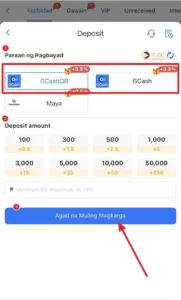
Open your X777 wallet or cashier page and select Deposit. You should then see the payment methods currently available to your account, such as GCash, GCash QR, or Maya.
Choose the method you are actually prepared to use. Switching between several channels midway through the process can leave multiple unfinished orders in your deposit history and make it harder to identify the correct transaction.
For a standard e-wallet transfer, GCash is a practical choice. For a quick scan-to-pay experience, GCash QR may be more convenient.
Enter Your X777 Deposit Amount
Select one of the displayed preset amounts or enter your preferred value manually. Based on the information shown in your original deposit page, the supported range is ₱50 to ₱50,000.
Before continuing, check that:
- The amount is within the displayed limit.
- Your e-wallet balance is sufficient.
- You selected the intended promotion, if one is offered.
- The deposit amount matches the payment request exactly.
For example, a 0.5% deposit reward would provide the following additional amounts:
| Deposit | 0.5% reward |
|---|---|
| ₱100 | ₱0.50 |
| ₱500 | ₱2.50 |
| ₱1,000 | ₱5 |
| ₱10,000 | ₱50 |
| ₱50,000 | ₱250 |
Although the reward is added automatically under the stated offer, check the current promotion details before depositing. Bonus percentages, eligibility rules, and wagering conditions can change.
Complete the E-Wallet Payment
Tap the blue Agad na Muling Magkarga button to generate the payment instructions. The phrase means “Recharge Now,” so this is the point where X777 creates the current deposit request.
Open GCash or Maya and follow the instructions shown on the page. If you selected GCash QR, scan the newly generated code rather than using an image from your gallery.
Before approving the transaction, compare the amount shown in your e-wallet with the amount entered on X777. A mismatch may prevent the payment from being identified automatically.
Confirm and Check Your Balance
After completing the transfer, return to X777 and finish any confirmation step displayed on the deposit page. Do not close the browser tab or app immediately after sending the money unless the instructions confirm that the process is complete.
Refresh your wallet and review the Deposit History section. When the transaction has been successfully matched, your account balance should update automatically.
Save the e-wallet receipt or take a screenshot showing:
- The amount paid
- Transaction date and time
- Recipient information
- Reference number
- Successful payment status
You probably will not need it, but it becomes important if customer support needs to trace the payment.
Before Making Your First X777 Deposit
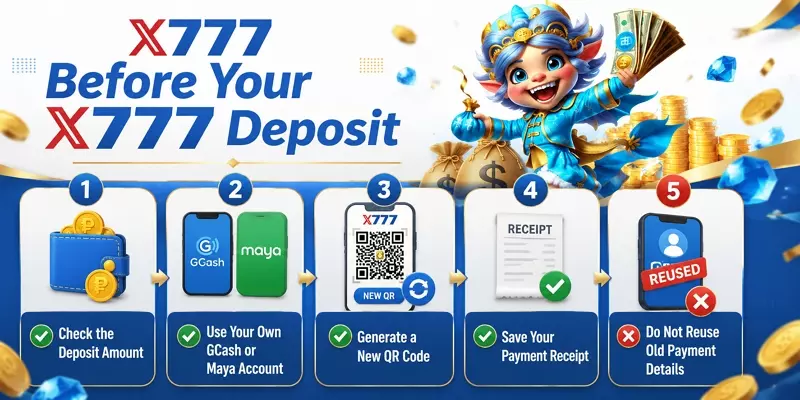
A little preparation can prevent most deposit problems. The goal is not simply to send money quickly; it is to make sure the system can correctly connect your payment with your X777 account.
Use Your Own Registered E-Wallet
Using an e-wallet registered under your own name makes payment verification easier. A transfer from a friend’s or relative’s account may still be accepted in some situations, but mismatched details can complicate manual reviews, refunds, or bonus claims.
For the smoothest process, use the same personal information across your X777 account and payment wallet whenever possible.
Generate New Payment Details Every Time
Payment accounts and QR codes can change between transactions. Treat every X777 Deposit as a new order.
Do not copy an old recipient number, bookmark a payment gateway, or reuse a previous QR code. Always begin from the current deposit page and follow the newly generated instructions.
Check Your Promotion Selection
Some deposit pages allow players to join a promotion or continue without one. Read the selection carefully before confirming.
Choosing a bonus may come with minimum deposit amounts, eligible games, wagering requirements, or withdrawal conditions. A slightly larger bonus is not useful when its rules do not match how you plan to play.
Avoid Making a Second Payment Too Quickly
When your wallet has been deducted but the X777 balance has not changed, the natural reaction is to send the payment again. That can turn a short processing delay into a duplicate transaction.
Check your e-wallet receipt and X777 deposit history first. Give the original order time to update, then contact official support if it remains pending.
What Happens After an X777 Deposit?
Once the payment is submitted, the payment provider confirms the transfer and X777 matches it with the deposit order created inside your account.
For most correctly completed GCash, QR, and Maya payments, the balance should update quickly. However, the transaction may remain pending when:
- The payment amount does not match the order.
- The QR code expired before payment.
- The deposit page was closed before confirmation.
- The payment channel is experiencing delays.
- The same order was paid more than once.
After your balance appears, check whether the advertised 0.5% reward was credited separately or included in your updated wallet total. Also review any promotion record to confirm that the correct offer was activated.
If the main deposit arrives but the reward does not, avoid making another deposit solely to trigger the bonus. Check the promotion terms or ask support whether the original transaction was eligible.
Common X777 Deposit Problems and Fixes
Your Deposit Is Still Pending
Start by checking whether GCash or Maya shows the transaction as successful. A pending or failed e-wallet transaction cannot be credited by X777 until the payment provider completes it.
When the wallet confirms payment but X777 still shows “pending,” refresh the app and review your deposit history. If there is no update after a reasonable waiting period, contact official customer support with your receipt and transaction reference.
Your GCash Balance Was Deducted but X777 Did Not Update
This often means the payment was sent successfully but has not yet been matched with the correct deposit order.
Do not delete your receipt or repeat the transfer. Provide support with the exact amount, transaction time, GCash reference number, and a screenshot showing successful payment.
The GCash QR Code Expired
Return to the X777 Deposit page and create a new order. Do not try to pay an expired QR code, as it may no longer be connected to an active transaction.
If you already paid using an old code, contact support immediately. Include both the payment receipt and the approximate time the QR code was generated.
The Deposit Reward Did Not Appear
Check whether you selected the relevant promotion and met its minimum deposit requirement. The 0.5% reward may also appear separately from the main balance or require a brief processing period.
Review the current offer rather than relying on an older screenshot or announcement. Promotions can be updated, paused, or restricted to specific payment methods and accounts.
Frequently Asked Questions About X777 Deposit
Q1. How long does an X777 Deposit take?
GCash, GCash QR, and Maya deposits are generally processed quickly and may appear almost immediately. Delays can occur during maintenance, peak traffic, payment-provider interruptions, or when the payment information does not match the deposit order.
Q2. What is the minimum X777 Deposit?
The deposit information provided shows a minimum of ₱50 and a maximum of ₱50,000. Confirm the limits displayed inside your own cashier page before submitting payment, as account or channel limits may differ.
Q3. Does X777 accept GCash?
Yes. The payment options described include standard GCash transfers and GCash QR payments. Only use the current recipient details or QR code generated through the official X777 payment page.
Q4. Can I cancel an X777 Deposit?
An unpaid deposit order can usually be left incomplete or cancelled by returning to the cashier. Once money has been sent through GCash or Maya, do not assume that closing the page cancels the transfer. Contact support if you paid but did not complete the confirmation process.
Q5. What should I do if I deposited twice?
Keep both transaction receipts and contact official customer support. Provide each reference number clearly. Do not initiate another payment or submit conflicting deposit requests while the duplicate transactions are being reviewed.
Final Thoughts
Completing an X777 Deposit is usually quick when you use an available payment channel, generate fresh payment instructions, and verify the amount before confirming. GCash, GCash QR, and Maya each offer a practical option, so the best choice is the one you can complete accurately and track through your own e-wallet.
If a transaction is delayed, check your receipt and deposit history before trying again. When further verification is needed, return to the official X777 site or contact official customer support instead of sending another payment through an unofficial link.