
X777 APP
App Download and Login for Mobile
Looking for the X777 App? This page covers the current mobile download, including the Android APK and how existing players can log in after installation. You can also check the latest version and the available access option for iPhone before choosing the right setup for your device.

X777 APK Download for Android
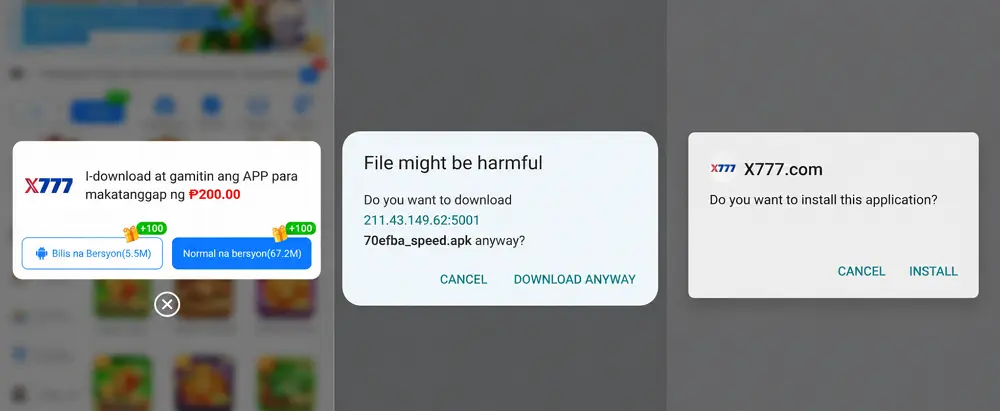
X777 gives Android users two APK choices instead of a single download. In our test, the download window showed a 5.5M Fast Version and a much larger 57.2M Normal Version, so it is worth checking which one you select before starting the download.
Fast Version vs Normal Version
The biggest visible difference on the current download screen is file size. The Fast Version is listed at 5.5M, while the Normal Version is 57.2M. We tested the smaller Fast Version, which started a direct APK download named 70efba_speed.apk. The download screen does not explain any feature differences between the two versions, so the confirmed difference here is the file size.
Installing the X777 APK
After downloading the Fast Version, Android displayed its usual file warning before continuing. Opening the APK then brought up an installation window showing the X777 logo and X777.com as the app name. Before tapping Install, check that the logo and app name match the download you just started.
X777 Login App for Existing Players
After installing the Fast Version, the app opens directly to the X777 mobile lobby. Login and Register are both displayed near the top of the home screen, so existing players do not need to look through the menu to find account access.
Login or Register
If you already have an account, select Login and use your existing account details. Register is for creating a new account, so installing the APK does not require existing players to sign up again.

X777 APK Latest Version
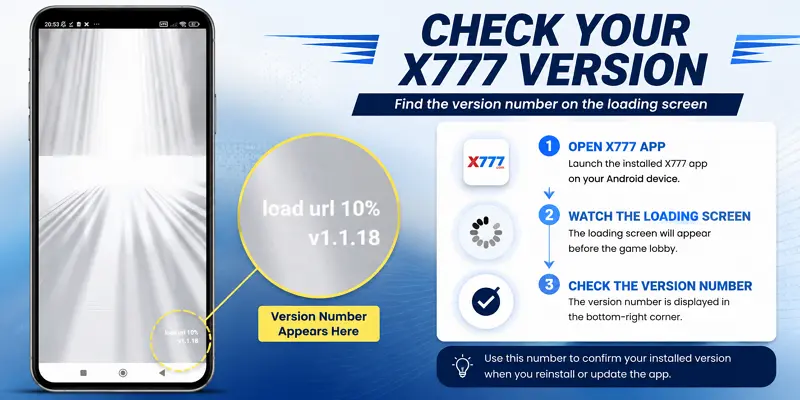
The installed X777 app displays its version number while the app is loading. In our current test, the Fast Version showed v1.1.18 in the bottom-right corner of the loading screen. You can use this number to confirm which version is currently installed on your device. The example below shows exactly where it appears during startup.
Checking Before You Download Again
If the app is already working normally, there is no need to download another APK simply because you see a different version number mentioned elsewhere. Check your installed version first. If you actually need to reinstall or update, return to the current X777 download page rather than searching for an old APK separately.
X777 App Download for iPhone
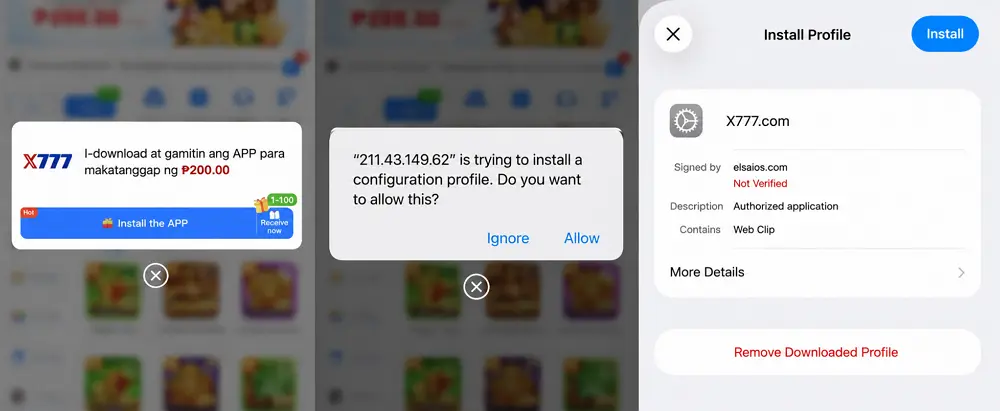
X777 uses a different installation method on iPhone. In our test, the iOS download option did not open the App Store or provide an APK. Instead, tapping the Mabilis na APP button prompted Safari to download a configuration profile.
After allowing the download, users can review the profile before installing it. The profile we tested was labeled X777.com and contained a Web Clip, so this works differently from installing a traditional App Store application.
What We Saw During the iPhone Installation
The current process we tested was:
Select Mabilis na APP → Allow Profile Download → Open Downloaded Profile → Review Profile → Install
One detail is worth checking before the final step. On our test device, iOS displayed elsaios.com as the signer and marked it as Not Verified. This information appears directly on the iPhone profile screen, so users can review it before tapping Install.
If the information shown on your device is different from what you expected, do not rush through the installation. If the profile information shown on your device does not match what you expected, stop before installing it and return to the current X777 download page to check the download option again.
Frequently Asked Questions – X777 App
A few details about the X777 App can still be confusing, especially when Android and iPhone use different installation methods. Here are quick answers to the questions players are most likely to have before or after downloading.
Yes. The X777 App can be downloaded without paying an app purchase fee. On Android, the current download page provides Fast and Normal APK options, while iPhone uses a different profile-based installation process. Keep in mind that downloading the app itself is free, but playing games with real money still requires funds in your X777 account.
The main difference shown on the download page is file size. The Fast Version is 5.5M, while the Normal Version is 57.2M. If your phone has limited storage or you prefer a smaller download, the Fast Version is the more practical choice. X777 does not currently specify any other functional differences between the two versions.
In our current test, the Fast Version displayed v1.1.18 on the loading screen. You can check your own installed version by opening the app and looking at the bottom-right corner during startup. The version may change with future updates, so the number shown in the app is more useful than relying on an older version number found elsewhere.
No. APK files are designed for Android and cannot be installed on an iPhone. In our test, the iPhone download option instead provided a configuration profile containing an X777.com Web Clip. This means the iOS installation process is different from the Android APK download.
Not always. If your installed app is still working normally, you can continue using it. Check the version number on the loading screen first. If an update or reinstall is needed, return to the current X777 download page to get the version being provided at that time.
Play Now on X777 APP
Choose the Version That Fits Your Device
Android users can choose between the 5.5M Fast Version and 57.2M Normal Version, while iPhone users follow a different profile-based installation process. Use the current X777 download page to get the option designed for your device, and check the details shown on screen before installing.