
Want to Play X777? Here’s How to Deposit and Get Started Fast!
Thinking about diving into the X777 game but not sure how to top up your account? Don’t worry—we’ve got your back. Whether you’re a complete beginner or a returning player, this guide will walk you through how to deposit on X777 step by step using GCash, GCash QR, or Maya—all popular and secure options in the Philippines. Let’s get you reloaded and ready to play in under 3 minutes.
Payment Options on X777 – What Can You Use?
When it comes to loading up your X777 wallet, the platform gives you flexible, user-friendly methods tailored to Filipino players:
| Payment Method | Processing Time | Bonus | Notes |
|---|---|---|---|
| GCash | Instant | +0.5% | Popular, stable, great for all users |
| GCash QR | Instant | +0.5% | Fastest for mobile users (scan-to-pay) |
| Maya | Instant | +0.5% | Great alternative with cashback support |
🎁 Bonus Alert: No matter which method you pick, you’ll get an automatic +0.5% cashback on your deposit—just a little extra boost to your wallet.
How to Deposit on X777 – Step-by-Step Guide
Depositing on X777 is super simple, whether you’re using your phone or tablet. Follow these steps and you’ll be in the game in no time:
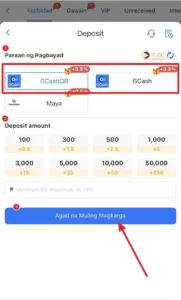

Step 1: Choose Your Payment Method
Once you’re logged into X777, go to the Deposit section. You’ll see three main options:
- GCash
- GCash QR
- Maya
👉 If you’re using your phone and prefer to scan, go with GCash QR for the smoothest experience.
Step 2: Select Your Deposit Amount
Choose a pre-set deposit amount or enter a custom value. You can deposit from ₱50 to ₱50,000.
Examples of bonus rewards you’ll see:
- ₱100 → +₱0.5
- ₱500 → +₱2.5
- ₱1,000 → +₱5
- ₱10,000 → +₱50
- ₱50,000 → +₱250
Not bad for just topping up!
Step 3: Tap the Blue Button
Click the big blue button that says: “Agad na Muling Magkarga” (that’s Tagalog for “Recharge Now”)
You’ll then receive payment instructions. Complete the payment via your chosen e-wallet app.
⏱️ Tip: Don’t forget to screenshot your payment just in case you need to show proof to support.
Is X777 Deposit Safe and Reliable?
Yes, it absolutely is. X777 uses secure, encrypted channels for all transactions. Plus:
- ✅ Verified e-wallets (GCash, Maya)
- ✅ Instant processing on most payments
- ✅ 24/7 customer support via live chat
- ✅ Complete deposit history tracking
⚠️ Just make sure not to reuse old QR codes or duplicate payments—they won’t be processed and can’t be recovered.
X777 Top-Up Bonuses You Shouldn’t Miss
Besides the +0.5% cashback, X777 sometimes runs special reload events, welcome promos, and mission-based rewards. Keep an eye on the following tabs inside the app:
- Gawain (Missions)
- Aktibidad (Promos)
- VIP (Loyalty perks)
📣 You can also follow official channels like Telegram or Facebook pages for flash deposit events.
Pro Tips to Maximize Your X777 Deposits
Here’s how smart players do it:
- 💳 Use GCash QR for quick, accurate transactions
- 🎯 Deposit during bonus hours (watch for announcements)
- 🧾 Always check the minimum/maximum limits: ₱50 – ₱50,000
- 🔒 Make sure your e-wallet name matches your game account
- 🤝 Contact support if deposit takes more than 3 minutes
Common Deposit Issues on X777 (And How to Fix Them)
Q1. “I deposited the money, but forgot to click the blue recharge button!”
Some players complete the e-wallet transfer but forget to return and tap “Agad na Muling Magkarga” in the app.
✅ Fix: Always tap the final confirmation button after payment. If you missed it, contact support with proof of payment.
Q2. “The QR code expired before I paid—what now?”
QR codes on X777 are time-sensitive. Using old ones can lead to rejected payments.
✅ Fix: Always generate a fresh QR code before each transaction. If you paid to an old code, contact support immediately with details.
Q3. “I accidentally sent money twice. Can I get it back?”
Rushing, laggy phones, or impatient double-taps.
✅ Fix: Contact customer support with both transaction references. If the system detects a duplicate, one may be manually refunded.
Q4. “Deposit went through, but the bonus didn’t apply.”
You might’ve selected “Do not join promo” by mistake.
✅ Fix: Double-check your promo selection before each top-up. For missed bonuses, ask support if retroactive credit is possible.
Q5. “My GCash was deducted, but my X777 balance didn’t change.”
The payment pushed through, but the game didn’t sync in time.
✅ Fix: Refresh the app, check “Deposit History”, and if needed, send your GCash receipt to support.
Q6. “Why is my deposit pending for more than 10 minutes?”
Peak traffic, backend system delays, or partial payment confirmation.
✅ Fix: Wait up to 15 minutes. If still stuck, reach out to live chat with a screenshot of your payment.
Q7. “Can I deposit using someone else’s e-wallet?”
Players sometimes borrow friends’ GCash/Maya.
✅ Fix: While not strictly blocked, mismatched names may delay approval or bonus claims. Best to use your own registered account.
Q8. “I used USDT but it’s not showing—what gives?”
USDT (crypto) requires on-chain confirmation and exact network matching (e.g. TRC20 vs ERC20).
✅ Fix: Double-check the network before sending. USDT support may take longer—allow 15–30 minutes or contact crypto support.
Q9. “Why is the Maya option sometimes missing?”
The system dynamically shows/hides channels based on availability and server load.
✅ Fix: Try again later or switch to another available method like GCash or QR.
Q10. “What happens if I cancel mid-deposit?”
Players back out midway, thinking it won’t affect anything.
✅ Fix: If you already sent the money, but cancelled before clicking the recharge button, contact support ASAP to sync the balance manually.
Final Thoughts – Get In and Play X777 Now!
Topping up your account is your golden ticket to the fun. Whether you’re into slot games, lucky spins, or jackpot-style action, X777 makes it easy to start playing in minutes. Choose your preferred method, make your deposit, and you’re off to the races!
🎮 Don’t let an empty wallet stop the fun—top up today and grab that bonus while you’re at it.